


Ashampoo Office 9 & PDF Pro 5 Bundle for Windows
Create Documents, Spreadsheets and Presentations with Great Ease - and Excellent Compatibility - AND Merge and Convert PDFs into MS Word documents, and Edit them Like Regular Text!
This Specially-Priced Bundle for Students, Faculty & Staff includes:Ashampoo Office 9 5-Install License (Download)
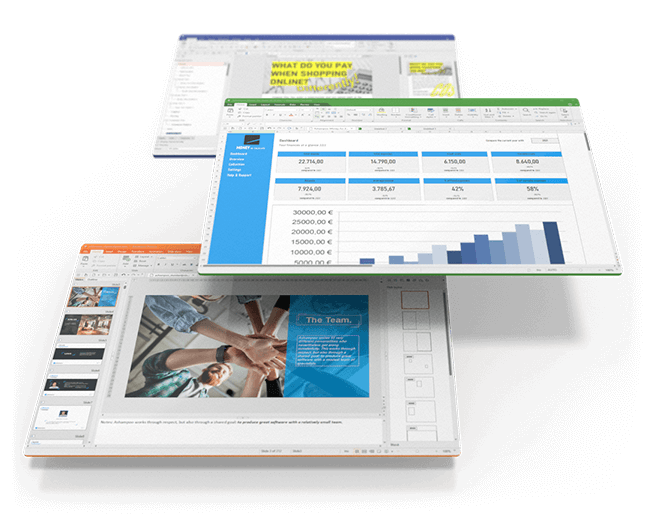
We've all seen Microsoft Office alternatives in the past but never one that is so affordable and greatly compatible with Microsoft document formats past and present. An Office suite without compromise, without a lengthy training period. Ashampoo Office 9 lets you create documents, spreadsheets and presentations faster than ever before. It has all the options and comfort you'd expect from a modern Office suite. And Ashampoo Office 9 doesn't save your files in some online cloud service but where they belong: on your PC! It's the Office suite you've always wanted!
If you use Ashampoo Office at home, you can run it on up to 5 PCs! A single license is enough to provide your entire family with a powerful office suite! If you use it commercially though, it's one license per installation.
Highlights include:
- Space-efficient PDFs with auto-scaling
- Auto-corrections of common typos for various languages
- Additional list view in "New document" dialog box
- Different formatting options for pasted clipboard content
- Insert WEBP images
- Improved spellcheck handling
- Easily edit grouped objects
- Display full document path in title bar
- Direct input of hex values for Unicode characters
- Auto-suggestions for hyperlink insertion
- Improved dark mode with dark sidebars
- Dark mode auto-toggle based on Windows settings
- Share documents with Windows apps
- Undo individual steps during text replacement
- File attributes like "Compressed", "Icon position on desktop" and "Owner" preserved during saving
- Elegant Windows 11 style
Applications include:
Excellent Word Processing with Ashampoo Write
Our Microsoft Word alternative offers a wealth of new options: Compare two documents side by side with synchronous scrolling, select multiple non-contiguous text ranges with the Ctrl key, and benefit from enhanced document change tracking! Create documents with embedded fonts that ensure your readers get the full experience even they don't have them installed! The new Book layout displays the first page of a document on the right in two-page view, table cells are now easily rotatable, and list numbering now supports right-alignment. Dummy texts can be created instantly and paragraph and character styles are now easily filterable. The best-in-class Word alternative has just gotten even better so what are you waiting for?
- Select multiple non-contiguous text ranges with the Ctrl key
- Easy two-document comparison with synchronous scrolling
- Embedded font support for TMDX and DOCX files
- Document-embedded fonts so recipients don't need to have them installed
- Display deletions in comments pane with change tracking enabled
- New Book layout with first page on the right in two-page view
- Filter paragraph and character styles by "All styles", "Styles in use" and "Styles in document"
- Rotate table cells with Table ribbon tab
- Displace whitespaces as dots for all Unicode variants
- Numbered lists with leading zeros
- Right-aligned list numbering
- Quickly create dummy texts
Excellent Spreadsheet Processing with Ashampoo Calculate
Creating complex calculations and charts in spreadsheets can be a hassle: Ashampoo Office 9's Calculate makes it fun and engaging. From simple timetables to complex corporate financial documentation, Calculate is a drop-in Excel replacement with all the features and none of the inconsistencies. It features instant syntax highlighting and formula validation to help you spot errors in seconds. With over 350 calculations, easy table handling and support for giant datasheets with millions of entries, Calculate 9 is ideal for any spreadsheet task. Pro-level features, like pivot tables, will satisfy even the most advanced of users. And printouts of finished spreadsheets are exceptionally easy to prepare, thanks to the new page break preview. Calculate 9 uses the XLSX file format, the same format used by Microsoft Excel!
- Import and export SQLite databases
- Sort by color (cell color and font color)
- Filter by color with AutoFilter
- Support for custom date order in CSVs (DMY, MDY, YMD)
- Dynamic cell-based chart titles, axis titles and data labels
- Custom decimal and thousands separators for CSV files
- Link texts in AutoShapes to table cells
- Convenient Formula ribbon tab with recalculation options
- Sort pivot tables with user-defined lists
Calculate is the perfect replacement for Excel! Naturally, our spreadsheet application is greatly compatible with all Excel documents. That means no learning curve, no conversion, even for the latest file formats. Version 9 can import and export SQLite databases and offers more flexible handling of CSV files. Smart auto-filters help you sift through data by color and chart titles and labels can now be auto-generated based on cell data, just like texts in AutoShapes. Recalculations are a piece of cake with the Formula ribbon tab, and neither is sorting through custom lists in pivot tables! Make the switch to Calculate and work with all popular formats today. You won't regret it!
Stunning Presentations with Ashampoo Present
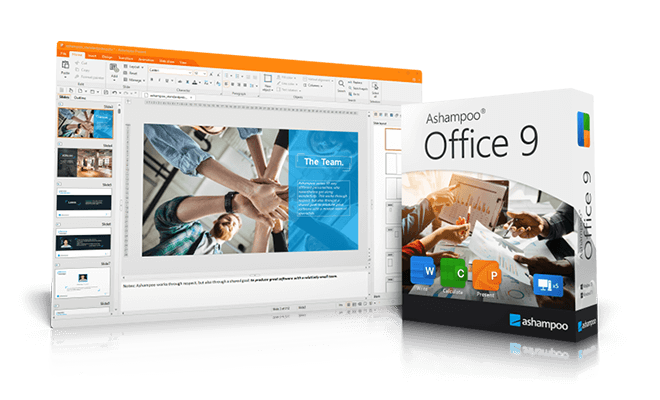
With easy handling and intuitive UI design, Present is the go-to replacement for PowerPoint. Version 9 features all-purpose dynamic slide transitions that are greatly compatible with PowerPoint! There is now an element for rotating table cells on the Table ribbon and fullscreen mode is more versatile thanks to togglable rulers. Create stunning and informative presentations without effort and enjoy great compatibility with MS PowerPoint!
- New dynamic PowerPoint-compatible slide transitions
- Element to rate table cells on Table ribbon tab
- Toggle rulers in fullscreen mode
Present is the powerful go-to replacement for PowerPoint that creates convincing presentations–even self-contained documents that play on any PC without additional software! With breath-taking animations, redesigned slide transitions, and a mature master slide system, Present can handle anything you throw at it! Create any number of master layouts and add placeholders with just a few clicks. This not only ensures a uniform and professional look but also enables great compatibility with PowerPoint. Numerous ready-made design templates that adapt to your needs at the click of a button will make your life so much easier. Sprinkle in graphics, charts, sounds, videos, and animations to make your presentations special and magical. The Media ribbon tab makes managing multiple objects a breeze. And since Present uses PPTX, your projects will instantly work with Microsoft PowerPoint.
Adjustable User Interface: Classic Look or Ribbon Style
With Ashampoo Office 9, you have a choice: traditional interface or modern ribbons? We don't want to force anything on you so we've kept the classic menu-based interface in. The modern ribbon interface is the way to go when speed and visual clarity are of the essence. It not only groups functions logically but provides great visual clues and instant feature access. By the way: You can still access all features through menus in ribbon mode, making the transition from menu to ribbon-based interface particularly easy. Whether you're a traditionalist or advocate of the modern approach, Ashampoo Office 9 has got you covered!
Seamlessly Switch between MS Office and Ashampoo Office!
Skip bothersome imports and exports: Ashampoo Office uses Microsoft's DOCX, XLSX, and PPTX formats as standard! Even mail merges are now supported for XLSX. Switch seamlessly between Ashampoo Office and Microsoft Office and get the best of both worlds, even with Office 2019 or Office 365. Your documents are now fully interchangeable and editable by you or others without loss of content or formatting!
Ashampoo PDF Pro 5 for Windows (Download)
Merge and Convert PDFs into MS Word documents, and Edit them Like Regular Text!
Ashampoo PDF Pro 5 is the complete solution to manage and edit your PDF documents. The program has everything you need to create, convert, edit, merge and protect your PDFs. Create perfectly sized documents that are readable on any device and use encryption to protect your property when needed. Your PDFs are now as easily editable as Word documents!
Highlights:
- 64-bit support for maximum performance, even with large documents
- Flexible view options with tabs, separate windows, or shared workspace
- Book layout for realistic double-page viewing
- Page-by-page scrolling for precise navigation
- Automatic document comparison via drag and drop
- Auto-applies most recently used font and size
- Open new files as tabs
Features include:
Faster Launch, Smoother Handling, Secure Saves

With full 64-bit support, Ashampoo PDF Pro 5 can access all available system memory to handle even the largest PDF files with ease. Now, you can work fluidly without delays or stutters, even with complex or data-heavy documents. Whether it’s technical manuals, research papers, or full catalogs–Ashampoo PDF Pro 5 handles them all with impressive speed and stability.
Edit Documents the Way You Work
You decide how Ashampoo PDF Pro 5 opens your files. Through the options menu, you can decide if new PDFs should open in tabs, separate windows, or within the same workspace. This ensures everything remains organized and optimized according to your workflow preferences. Whether you favor focused, single-document editing or juggling multiple projects simultaneously, Ashampoo PDF Pro 5 seamlessly adapts to your style.
Work Smarter and Save Clicks with Intelligent Features
Ashampoo PDF Pro 5 anticipates your needs and delivers noticeable convenience in daily use. When you open a PDF from Windows Explorer, it now appears as a new tab within your existing window. The new Book Layout view displays two pages side by side, just like a real book, and Page-by-Page Scrolling lets you move precisely one page per mouse wheel turn. Drag and drop two PDF files into the program to start an instant document comparison and see differences at a glance. When adding text, Ashampoo PDF Pro 5 remembers your last used font and size, ensuring a consistent look without manual adjustment.
Post-Edit Your Documents in MS Word or Other Formats
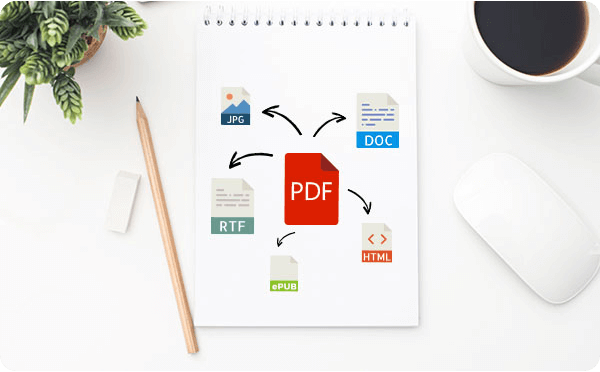
Ashampoo PDF converts your PDFs into text documents editable with MS Office or Ashampoo Office. HTML, EPUB, JPG or RTF are also supported as output formats. Ashampoo PDF Pro furthermore supports optical character recognition to convert your scans into editable and searchable documents.
Built-in PDF Printer Driver for Maximum Flexibility
Ashampoo PDF can create high-quality PDFs from any Windows application. Simply click "Print" and select the included Ashampoo PDF virtual printer. If size matters, Ashampoo PDF can automatically downsample images, e.g. to facilitate online publishing.
Create Trustworthy PDFs with Digital Signatures
Sign your documents for authenticity and added trust! Digital signatures are the equivalent of an ink signature on a paper document, but much more secure. They signal authenticity and prevent secret tampering. Ashampoo PDF Pro makes signing your documents super easy and helps you build trust with your recipients.
System Requirements:
- Windows® 11, Windows® 10
- Any device that supports the operating systems listed above.
- An Internet connection is required to activate the program. The program license is verified repeatedly at regular intervals.
- Full administrative rights are required to use the program.


